
Do You Need a Shopify Terms and Conditions Checkbox?
Do you need a Shopify terms and conditions checkbox? Learn when to require agreement, where to place it, and how to avoid checkout friction with Lavar.


A customer adds a standard T-shirt to their cart and prepares to pay. Before checkout, they encounter a required checkbox asking them to agree to the store's terms and conditions.
For this ordinary purchase, the extra step may not tell the customer anything they need to know. Now consider a personalized necklace that cannot be changed after engraving begins, or a pre-order with a longer-than-usual fulfillment timeline.
Those purchases involve conditions customers should understand before committing to an order.
A Shopify terms and conditions checkbox can help merchants present important purchase terms and request an explicit acknowledgement before checkout. However, adding one to every order is not automatically necessary or beneficial.
The practical answer: Use a required checkbox when customers need to actively acknowledge a material condition that is not adequately communicated through ordinary product information and policy links. For standard purchases, clear policies and visible product information may be sufficient without another required action.

Image source: Shopify Community — Cart Drawer Example. Illustrates the standard cart experience without an additional agreement requirement.
What Does a Terms and Conditions Checkbox Actually Do?
A terms checkbox introduces an explicit acknowledgement step before the customer continues through the purchase process.
It asks customers to confirm specific information
A typical checkbox appears next to a short statement such as "I have read and agree to the Terms and Conditions," with a link to the relevant policy.
When configured as required, the customer must select it before proceeding through the covered checkout route.
The checkbox can draw attention to important purchase conditions, but it does not guarantee that a customer has read or understood every paragraph in the policy.
Its value depends on what the shopper is being asked to acknowledge and how clearly that information is presented.
It does not replace published store policies
Shopify supports store policies covering terms of service, returns, privacy, shipping, and other relevant information.
According to Shopify's store policy documentation, published policies are automatically linked in the checkout footer, and merchants can add them to storefront navigation.
A checkbox is an additional interaction with those terms, not a substitute for maintaining accurate and accessible policies.
It does not automatically establish legal compliance
Some merchants introduce checkboxes because they believe every online store is legally required to have one.
That assumption is too broad. Requirements depend on the jurisdiction, transaction type, terms involved, and applicable consumer protection rules.
A checkbox cannot make an otherwise unfair, misleading, or unenforceable term legally valid.
Merchants should review applicable obligations with qualified legal advisers rather than treating a required checkbox as a universal compliance solution.
When Is a Terms Checkbox Worth Adding?
A checkbox is most useful when a purchase includes an unusual or material condition that deserves deliberate acknowledgement.
| Purchase Scenario | Checkbox Recommendation | Main Reason |
|---|---|---|
| Standard retail products | Usually optional | Ordinary policies may already provide sufficient information. |
| Personalized products | Often worth considering | Customer specifications may become difficult to change. |
| Pre-orders | Often worth considering | Fulfillment timing or availability may differ. |
| Final-sale products | Depends on the actual terms | Return limitations need clear disclosure. |
| Digital goods | Evaluate carefully | Delivery, access, and cancellation conditions may be relevant. |
| Age-restricted products | Not sufficient alone | Actual age-verification requirements may apply. |
| Subscriptions | Depends on subscription terms | Recurring charges and cancellation conditions need clear disclosure. |
Standard retail orders rarely need extra acknowledgement
For ordinary clothing, accessories, home goods, and similar products, a required checkbox may add little value when the store already communicates its policies clearly.
Customers generally want to review the item, confirm delivery information, and complete payment.
An additional agreement step can interrupt that flow without resolving a specific uncertainty.
If a merchant cannot identify an important condition that requires explicit acknowledgement, the better starting point may be improving product information and policy visibility instead.
Personalized products have meaningful purchase conditions
Custom engraving, made-to-order furniture, personalized gifts, and similar products may involve production commitments that begin soon after purchase.
For example, a merchant might need customers to confirm that submitted initials, measurements, or artwork are correct before production.
A relevant acknowledgement could emphasize the customer's responsibility to review their personalization details.
However, the checkbox should not replace validation of the actual custom fields. Confirming general terms does not prove that an engraving request contains the correct spelling.
Pre-orders involve timing and availability expectations
Pre-orders frequently differ from standard purchases because the product may not be ready for immediate shipment.
Customers may need to understand an estimated release date, possible fulfillment changes, payment timing, or the process for updates.
A checkbox can reinforce a clearly stated pre-order condition, particularly when the delivery timeline differs substantially from the store's normal service.
It should not hide an important delay inside a long policy document.

Image source: Safe As Milk — Pre-order Product Page Setup. Example of visible pre-order information, not a Lavar feature screenshot.
Which Special Product Terms Deserve More Attention?
Different product categories create different expectations, so the acknowledgement should match the actual purchase risk.
Final-sale and limited-return products
A merchant might offer discounted samples, clearance items, or customized goods under special return conditions.
Customers should be able to understand those conditions before buying.
However, labeling a product "Final Sale" does not automatically remove statutory cancellation, refund, or consumer rights.
Where an acknowledgement is appropriate, explain the specific limitation accurately and link to the relevant policy.
A short message is more useful than a vague statement claiming that the customer waives every possible return right.
Digital downloads and access-based products
Digital products may involve immediate file delivery, download limits, license terms, or restricted access.
A customer purchasing a digital template, for example, might need to understand whether the purchase includes commercial usage rights or only personal use.
Merchants should explain these conditions on the product page and consider whether an additional acknowledgement is necessary.
For digital content, special cancellation or withdrawal rules may apply depending on the market. A checkbox alone does not satisfy every legal requirement or automatically remove applicable rights.
Subscriptions and recurring purchases
Subscription purchases introduce ongoing obligations that differ from one-time orders.
Customers may need to understand billing frequency, renewal conditions, cancellation instructions, and recurring charges.
Shopify supports subscription-related purchase options and policy information, but merchants should follow the requirements of their subscription configuration and the applicable regulations.
A general terms checkbox should not replace specific subscription disclosures or controls required by the purchase flow.
Age and product restriction acknowledgements
Some merchants sell goods subject to age restrictions or other special requirements.
Asking customers to confirm that they meet an age requirement may be part of a broader purchase process, but it is not necessarily sufficient verification.
Where reliable identity or age verification is required, a self-declared checkbox may not meet the applicable standard.
Merchants should use an appropriate verification process rather than assuming that ticking "I am over 18" resolves every restricted-product requirement.
Required Checkbox vs. Clear Policy Links
Before requiring another interaction, determine whether better information placement could solve the same customer problem.
Use product-page information for product-specific terms
A personalized product should explain its customization process beside the relevant input fields.
A pre-order should show its expected fulfillment timing near the purchase controls.
A final-sale product should communicate meaningful return limitations where customers evaluate the item.
These details are easier to understand when presented in their natural purchasing context.
Forcing customers to open a general terms page may not be the most effective way to communicate them.
Keep policies accessible without forcing an acknowledgement
For standard transactions, merchants can use Shopify's existing policy links and theme navigation to help customers find important information.
Shopify automatically links published store policies in checkout. Depending on the theme, shipping information may also appear on product pages and in the cart.
A clear link labeled "Returns & Refunds" communicates more than an unexplained checkbox asking customers to accept every store policy.
Choose the least disruptive approach that addresses the issue
Consider three levels of communication:
- Visible information: Explain the condition near the product or purchase control.
- Contextual policy link: Provide access to the detailed rules.
- Required acknowledgement: Add explicit confirmation when the purchase warrants it.
These methods can complement one another, but not every purchase needs all three.
Adding repeated warnings, links, and checkboxes can make important terms harder to distinguish from routine interface content.
How to Write a Clear Terms and Conditions Checkbox
A useful checkbox message should identify the relevant policy or commitment without forcing the shopper to interpret a long sentence.
Keep the primary message short
For a general terms acknowledgement, a straightforward message is:
"I have read and agree to the Terms and Conditions."
The words "Terms and Conditions" should link to the actual policy.
For a pre-order, a more specific message could be:
"I understand this is a pre-order and have reviewed the estimated shipping timeline."
The final wording should match the store's actual terms and legal requirements.
Avoid combining unrelated permissions
Terms acceptance, marketing consent, and cookie preferences serve different purposes.
Do not assume that a shopper agreeing to purchase terms has also consented to receive promotional emails or accept optional tracking.
Where separate consent is required, it should be collected through the relevant process.
A single checkbox should not bundle unrelated decisions in a way that obscures what the customer is agreeing to.
Use specific and understandable error messages
If a customer attempts to continue without selecting a required checkbox, explain what is missing.
For example:
"Please review and accept the Terms and Conditions before continuing to checkout."
Avoid generic messages such as "Invalid input" or "Something went wrong."
The message should appear near the relevant checkbox and remain readable on mobile.
How to Add a Terms and Conditions Checkbox With Lavar
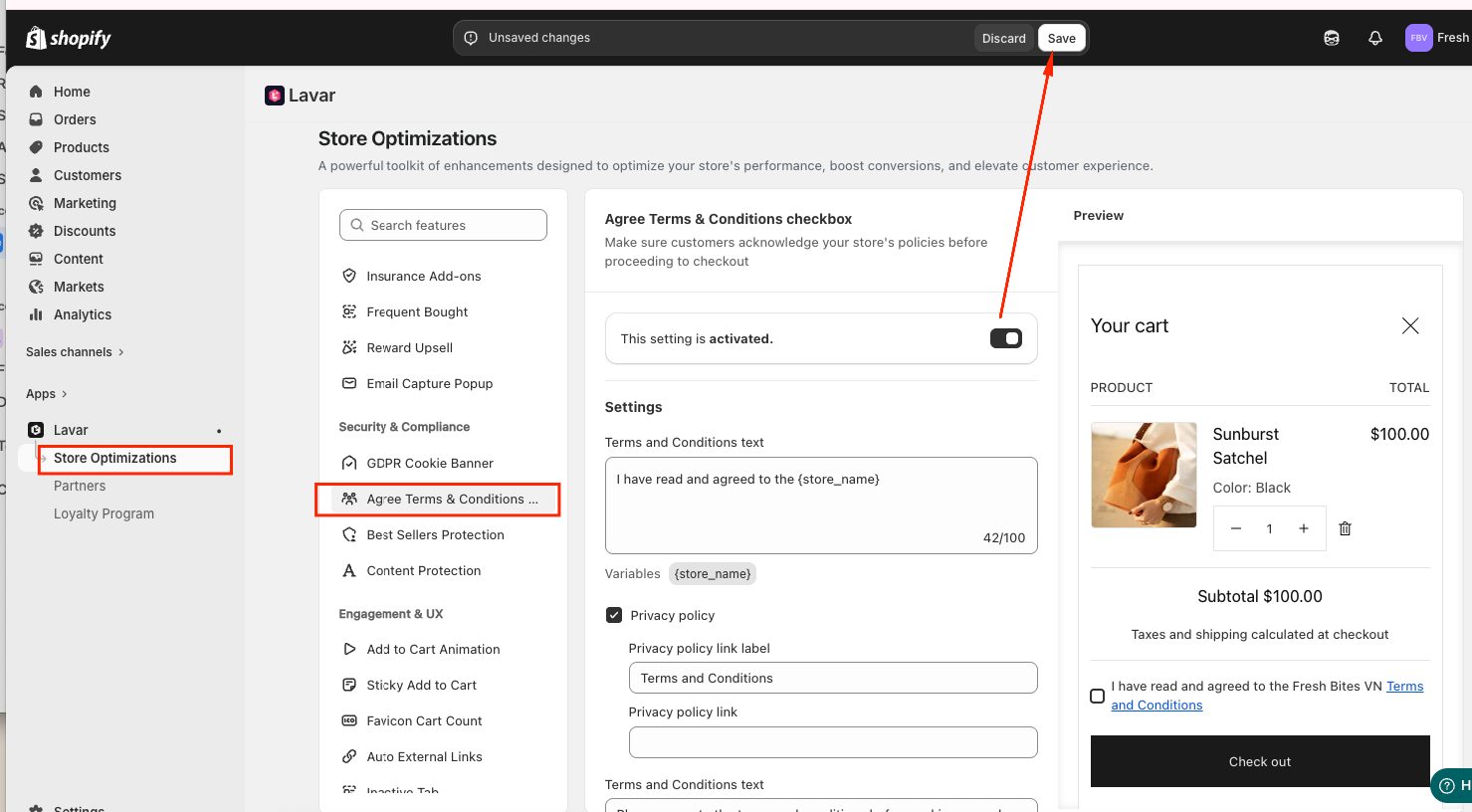
Lavar provides an Agree Terms & Conditions Checkbox feature that helps merchants request policy acknowledgement before proceeding to checkout.
The official Lavar Help Center documents feature activation, customizable checkbox text, policy linking, and appearance settings.
Step 1: Enable Lavar in the Shopify theme
Before activating the feature, confirm that the Lavar app embed is enabled in the Theme Editor.
Shopify merchants can open Online Store → Themes → Edit theme → App embeds, then enable Lavar and save the changes.
Lavar's theme activation guide also describes how to verify that the app embed has been enabled successfully.
Step 2: Activate the checkbox feature
Open Lavar in Shopify Admin and navigate to Store Optimizations → Agree Terms & Conditions Checkbox.
Choose Activate feature and save the setting.
The official Lavar checkbox setup guide describes this activation workflow.
Step 3: Configure the terms text and policy link
In General Settings, customize the text displayed beside the checkbox.
Lavar also provides settings for the policy link label and destination URL.
Use a clear label and link to the relevant, publicly accessible policy page.
For example, Shopify's standard terms-of-service policy path is /policies/terms-of-service when that policy is published.
If you use another policy page, verify that the link is correct and the content matches the wording customers are acknowledging.
Step 4: Match the checkbox to your storefront
Lavar's Appearance Settings allow merchants to customize checkbox-related colors to better fit the store design.
Choose readable colors and sufficient contrast for the text, checkbox, links, and error message.
Do not make the acknowledgement visually resemble a marketing opt-in or hide the policy link in small, low-contrast text.
Step 5: Test acknowledgement behavior
Open the published storefront and add a product to the cart.
Confirm that the checkbox appears in the intended cart experience and that the policy link opens correctly.
Attempt to continue without accepting the terms and verify the expected warning or restriction.
Then select the checkbox and confirm that customers can proceed normally.
Lavar's published documentation demonstrates the cart-level acknowledgement experience. It does not establish that the feature automatically records timestamped legal consent or applies to every accelerated checkout path.
Make Sure Shoppers Cannot Bypass Required Agreement
A cart-based checkbox may not cover every way shoppers can enter checkout, particularly when accelerated purchase buttons are available.
Test Buy Now and accelerated checkout buttons
Shopify's accelerated checkout compatibility guidance explains that accelerated checkout buttons do not support cart attributes such as traditional terms and conditions checkboxes.
A customer using a Buy Now button from a product page may bypass the ordinary cart experience.
If the merchant relies on a cart-level acknowledgement, they must test whether that purchase path respects the intended requirement.
Do not assume that activating a cart checkbox makes it universally enforceable across all checkout entry points.
Understand checkout-level alternatives
Shopify offers checkout customization capabilities that differ from theme-level cart features.
For eligible Shopify Plus stores, Checkout Blocks supports an Agree to terms custom field template.
Shopify also provides checkout app functionality that can restrict order completion when supported validation requirements are not met.
Those options have separate eligibility, configuration, and compatibility requirements.
A merchant should distinguish between a checkbox displayed in the cart and a validation rule enforced within checkout.
Do not claim proof of agreement without records
Some specialized consent tools can record acknowledgement data on orders, but not every checkbox implementation provides the same documentation.
Before claiming to maintain proof of acceptance, verify whether the chosen system records the agreement, the relevant terms version, and any other information required for the merchant's intended purpose.
Displaying a checkbox and storing verifiable acceptance records are separate capabilities.
How to Reduce Friction From Required Checkboxes
Even a useful acknowledgement can interfere with purchase completion when it is difficult to find or unnecessarily complicated.
Place the checkbox near the next action
For a cart-level acknowledgement, placing the checkbox near the checkout button helps shoppers understand its relationship to the next step.
Do not bury the checkbox above a long list of cart recommendations or below information that requires extensive scrolling.
On mobile, test whether the checkbox and its error state remain visible when the customer attempts to continue.
Avoid multiple unnecessary checkboxes
A cart containing ordinary products should not require separate acknowledgements for every minor policy detail.
For example, separate required checkboxes for shipping, refunds, terms of service, and marketing preferences can make a simple purchase feel unnecessarily complicated.
Use direct disclosures and relevant policy links where they provide adequate information.
When multiple distinct acknowledgements are genuinely needed, make each one specific and review the overall checkout experience for unnecessary complexity.
Use conditional requirements when supported
Ideally, a special acknowledgement should appear only when the relevant product or purchase condition exists.
For example, a checkbox related to custom engraving would be more meaningful for personalized products than for ordinary accessories.
However, Lavar's currently documented setup does not establish product-specific conditional display rules for its terms checkbox.
Merchants who need conditional acknowledgement by product, cart contents, or market should verify whether their chosen app and Shopify plan support that configuration.
How to Test Whether a Terms Checkbox Helps
Testing should determine whether the checkbox makes important conditions clearer without introducing unnecessary obstacles.
Check the complete purchase journey
Create a testing matrix for the purchase paths customers actually use.
| Test Scenario | What to Verify |
|---|---|
| Standard cart checkout | Checkbox, link, and required behavior work as intended. |
| Cart drawer checkout | Agreement remains visible and accessible. |
| Mobile shopping | Text and error messages are readable. |
| Product-page Buy Now | Any bypass of cart acknowledgement is understood. |
| Accelerated payment | Actual behavior matches the store's requirements. |
| Policy link | Correct, published terms open successfully. |
| Incomplete agreement | Customer receives actionable feedback where enforced. |
Watch for avoidable purchase interruptions
After implementing a required checkbox, monitor customer questions and checkout behavior.
Useful indicators include checkout completion rate, cart abandonment, support contacts about agreement errors, and the frequency of customers encountering the required-field warning.
Do not assume that every decline in conversion is caused by the checkbox. Compare similar traffic sources, product mixes, and promotional periods before drawing conclusions.
Review terms after policy changes
If the store changes its return policy, preorder commitments, or other acknowledged conditions, review the linked policy and checkbox wording.
Make sure the agreement still points to the correct information.
For merchants maintaining consent records through a separate supported system, review how policy updates and versioning are handled.
Shopify Terms Checkbox Decision Checklist
Use this checklist to decide whether a required agreement adds meaningful value to your purchasing experience.
- Identify the condition: Determine which purchase term needs explicit acknowledgement.
- Check existing information: Review product descriptions, policy links, and purchase notices before adding another control.
- Assess purchase complexity: Consider pre-orders, custom goods, digital access, subscriptions, and relevant restrictions.
- Review legal obligations: Do not assume that a checkbox alone satisfies applicable requirements.
- Write clear wording: Keep the acknowledgement concise and relevant.
- Link the correct policy: Use a publicly accessible page that matches the condition.
- Choose appropriate placement: Keep the checkbox visible near the relevant purchase action.
- Test bypass paths: Review cart, Buy Now, and accelerated checkout behavior.
- Verify recordkeeping if needed: Confirm what evidence the implementation actually stores.
- Monitor friction: Review customer feedback and checkout outcomes after activation.
If the store cannot identify a clear purpose for requiring acknowledgement, improving policy visibility may be a better first step.
Final Thoughts
A Shopify terms and conditions checkbox can be useful for purchases involving important conditions such as personalization, pre-order timelines, digital access, or special fulfillment terms. It is not automatically necessary for standard retail transactions, nor does it replace accurate policies or legal review. Lavar provides a cart-level agreement feature with customizable text, policy links, and appearance settings. Merchants should use it where an explicit acknowledgement adds value, test the purchase paths it actually covers, and avoid turning a simple checkout into a series of unnecessary confirmations.
FAQ
Is a terms and conditions checkbox required on every Shopify store?
No universal rule makes the same checkbox necessary for every Shopify store. Requirements vary by jurisdiction and transaction, so merchants should review their particular obligations and purchase conditions.
Can Lavar require customers to agree to terms before checkout?
Lavar documents an Agree Terms & Conditions Checkbox feature that requests acknowledgement in the cart before proceeding to checkout. Merchants should test accelerated checkout paths separately rather than assuming universal enforcement.
Should I use a terms checkbox for pre-orders or custom products?
It can be useful when customers need to acknowledge important delivery timelines, customization requirements, or other purchase conditions. The same information should also be clearly displayed on the relevant product page.
Read More


