
How to Set a Free Shipping Bar Without Losing Margin
Learn how to set a Shopify free shipping bar using AOV, shipping costs, and gross margin. Compare thresholds and protect profits with Lavar.


A customer has $58 worth of products in their Shopify cart. Your store offers free shipping on orders over $75, so a progress bar encourages them to spend another $17.
The customer adds a product, reaches the threshold, and completes a $75 order. Your average order value increases, but you now pay for shipping that the customer would otherwise have paid for.
Was the larger order actually more profitable?
That is the question merchants should answer before activating a Shopify free shipping bar.
A free shipping progress bar can encourage customers to add products and reach a spending goal. However, a poorly chosen threshold may subsidize shipping on orders that would have happened anyway, while a threshold set too high may give shoppers little reason to add another item.
The practical approach: Start with your current average order value, calculate the shipping subsidy and gross margin, then choose a realistic threshold that encourages profitable additional purchases. Use the progress bar to communicate that goal, not to determine the economics of the offer.
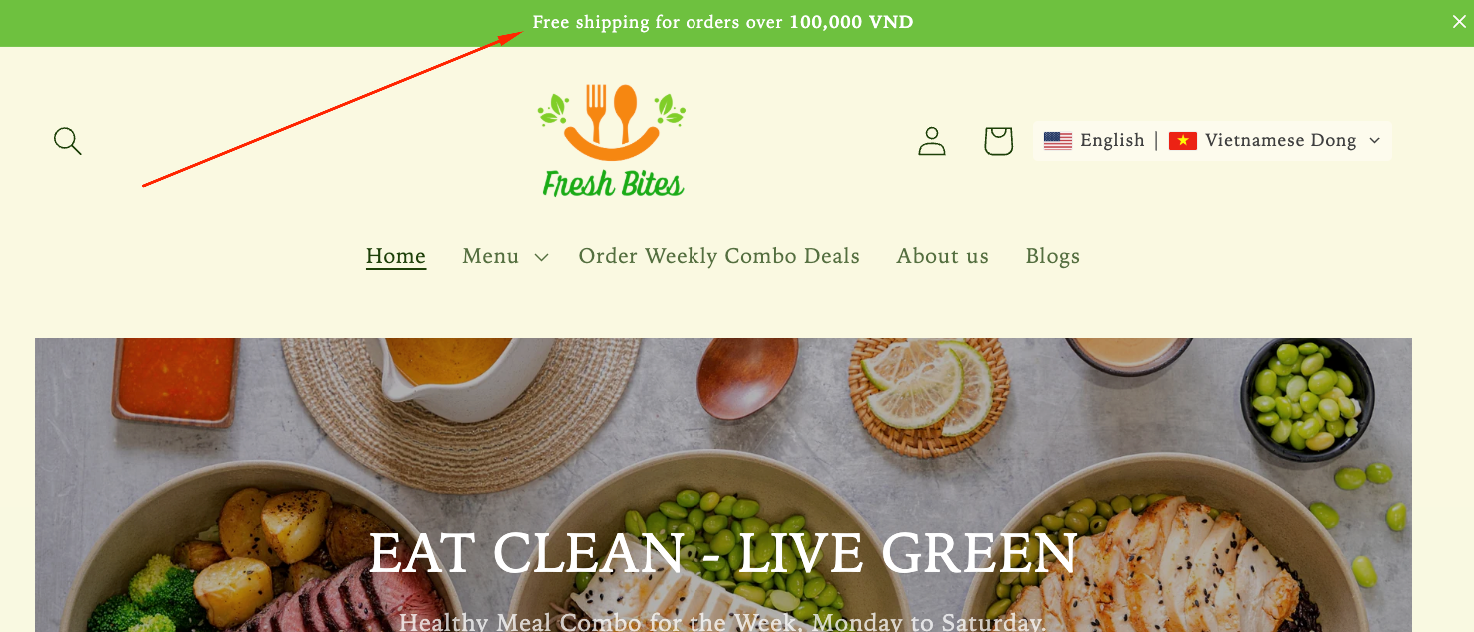
Image source: Lavar Help Center — Free Shipping Bar.
Why Free Shipping Bars Can Increase AOV but Hurt Margins
A larger cart does not automatically mean a more profitable order, especially when the merchant absorbs an additional delivery expense.
Free shipping is a cost, not a discount without consequences
When customers qualify for free shipping, the merchant still pays the carrier or fulfillment provider.
If a customer previously paid $5 for shipping and now pays nothing, the merchant loses that $5 in shipping revenue.
The actual financial impact also depends on carrier costs, packaging, additional fulfillment expenses, and whether the larger cart changes the shipment's weight or dimensions.
Shopify's shipping strategy guidance recommends accounting for shipping expenses when designing free shipping offers.
Some customers would have purchased anyway
Imagine a customer who already has $82 in their cart.
If you introduce a $75 free shipping threshold, that customer qualifies immediately without adding anything.
Unless the offer changes their decision to purchase, the merchant provides a shipping benefit without receiving additional product revenue.
This is one reason setting the threshold below your existing average order value can be expensive.
However, AOV alone does not reveal how many orders already sit above a proposed threshold. Merchants should also examine the distribution of order values.
Additional products have their own costs
A $15 add-on does not contribute $15 in profit.
Its contribution depends on product cost, discounts, payment fees, and any extra fulfillment expenses.
Low-margin products may contribute relatively little toward the shipping subsidy. Heavy or bulky products can make the final shipment more expensive.
The right threshold must consider what customers are likely to add, not simply how much more they might spend.
Start With Your Current Average Order Value
Average order value provides a useful starting point for deciding whether a free shipping threshold is achievable.
Calculate your current AOV
The basic formula is:
Average Order Value = Total Order Revenue ÷ Number of Orders
For example, if a store generates $29,000 in order revenue from 500 orders during a reporting period, its AOV is $58.
Use a consistent revenue definition and reporting period. For threshold planning, also review product subtotals after discounts because taxes, shipping charges, and eligibility calculations can differ.
AOV gives you a benchmark, but it should not become the sole input.
Examine the distribution of cart values
Two stores can have the same AOV and very different customer purchasing patterns.
One store might receive mostly 50–65 orders. Another might receive many $20 purchases alongside a smaller number of $150 orders.
The same $75 threshold would create different incentives for these stores.
Review the percentage of orders within useful ranges, such as:
- Below $50.
- 50–74.99.
- 75–99.99.
- $100 or more.
For a $75 threshold, orders between $50 and $74.99 are particularly relevant because those customers may be close enough to add another product.
Use real product prices to assess the basket gap
The basket gap is the difference between the customer's current eligible cart value and the free shipping threshold.
Basket Gap = Free Shipping Threshold − Eligible Cart Value
For example, a customer with a $63 eligible cart subtotal needs another $12 to qualify for free shipping at $75.
That gap is more actionable when the store sells relevant 10–20 add-ons.
If most available products cost $80, asking the customer to spend another $12 may not translate into a useful purchasing opportunity.
Compare $50, $75, and $100 Free Shipping Thresholds
Instead of selecting a round number arbitrarily, compare possible thresholds against the store's existing order values and product economics.
Consider an illustrative store with:
- Average order value: $58.
- Average outbound shipping cost: $8.
- Shipping fee paid by customers below the threshold: $5.
- Average merchandise gross margin: 40%.
- Relevant add-on products priced around 12–20.
| Threshold | Gap From $58 | Potential Advantage | Main Risk |
|---|---|---|---|
| $50 | Already qualified | Simple, attainable customer benefit | Subsidizes shipping without requiring an additional purchase |
| $75 | $17 | Potentially reachable with one add-on | Additional margin may barely offset lost shipping revenue |
| $100 | $42 | Higher potential order value | Too large a gap for many ordinary carts |
These are planning scenarios, not universal recommendations. The best threshold depends on real cart behavior and costs.
Why $50 may be too generous
With an AOV of $58, many orders may already qualify for a $50 threshold.
Those customers receive free shipping without necessarily purchasing additional items.
For a store with modest margins, this can turn the promotion into a delivery subsidy rather than an incentive to increase cart value.
Why $75 may create a realistic incentive
A $75 threshold creates a $17 gap for a $58 cart.
If the store sells relevant accessories in that price range, the customer may be willing to add something useful.
However, even a successful upsell does not guarantee a substantial increase in contribution profit.
Merchants should calculate whether the added product margin covers the shipping revenue they give up and any new fulfillment costs.
Why $100 may be too distant
Increasing a $58 cart to $100 requires another $42 in purchases.
That may be realistic for stores selling complementary products at higher prices, but less achievable for stores with small, occasional purchases.
A progress bar that repeatedly tells customers they are $40 or more away from free shipping may provide little motivation.
The goal should feel achievable without pressuring customers to buy unrelated products.
Calculate Whether the Extra Cart Value Covers Shipping
The key comparison is incremental merchandise contribution versus the shipping revenue lost and any additional order costs.
Use an incremental contribution calculation
For a simplified threshold decision:
Incremental Contribution = Added Merchandise Gross Profit − Shipping Revenue Forgone − Additional Fulfillment Costs
Assume a customer originally planned to purchase $58 of products and pay $5 for shipping.
The store's actual shipping cost is $8, and its merchandise gross margin is 40%.
Compare that with a scenario where the customer adds $17 and qualifies for free shipping at $75.
| Metric | Original Order | After Reaching Threshold |
|---|---|---|
| Merchandise revenue | $58.00 | $75.00 |
| Merchandise gross profit at 40% | $23.20 | $30.00 |
| Shipping revenue | $5.00 | $0.00 |
| Actual shipping cost | -$8.00 | -$8.00 |
| Illustrative contribution | $20.20 | $22.00 |
In this example, the larger order generates only $1.80 of additional contribution before payment fees, extra handling costs, and other variable expenses.
The $17 increase in revenue looks significant, but its contribution to profit is much smaller.
This calculation also assumes the customer would have completed the original order and that the added item does not increase shipping costs.
Understand the break-even basket gap
Under the same assumptions, the store loses $5 in shipping revenue when the customer qualifies for free delivery.
At a 40% merchandise gross margin, the additional merchandise revenue needed to cover that lost shipping revenue is:
$5 ÷ 0.40 = $12.50
That means the customer must add at least $12.50 of similarly profitable merchandise to offset the lost shipping revenue, assuming no change in shipping or fulfillment costs.
Actual break-even gaps may be higher when add-on products carry lower margins or increase package costs.
Conversely, a free shipping offer may still make business sense when it improves conversion or repeat purchase behavior. Those benefits should be measured rather than assumed.
Should Discounts Count Toward the Free Shipping Threshold?
Discounts can change whether a cart qualifies for free shipping, so the progress bar must follow the same eligibility logic as checkout.
Understand how Shopify free shipping discounts calculate eligibility
For Shopify's free shipping discount feature, the minimum purchase amount is based on eligible product prices after applicable combinable discounts.
Taxes and shipping are excluded from that minimum, while gift cards purchased as products count toward the minimum under Shopify's documented rules.
Gift cards or store credit redeemed as payment do not reduce the minimum purchase amount calculation.
For example, if a $75 eligible merchandise cart receives a combinable $10 product discount, its qualifying amount can become $65.
It would no longer meet a $75 minimum purchase requirement for that free shipping discount.
See Shopify's free shipping discount documentation.
Distinguish shipping-rate thresholds from discounts
Shopify also supports free shipping through order amount-based shipping rates.
This is separate from creating a free shipping discount in the Discounts section.
Merchants should verify how the configured shipping option evaluates the cart amount, including discounts, shipping profiles, and other conditions.
Do not assume that every shipping-rate configuration behaves identically to a free shipping discount.
Make the progress message reflect actual checkout eligibility
Suppose the progress bar says:
"You're $12 away from free shipping."
After a discount is applied, the customer may no longer qualify at the previously displayed amount.
The merchant should test how the Lavar bar responds to discount changes and compare the message with the free shipping option available at checkout.
If the two calculations cannot be aligned in a particular setup, avoid publishing a misleading progress promise.
Should You Offer Free Shipping in Every Market?
A single threshold may not be financially appropriate when shipping costs vary significantly across countries or regions.
Review delivery costs by destination
A store shipping domestically may have an average shipping cost of 7–8 but pay substantially more for international delivery.
Offering free shipping above $75 in both regions could create very different contribution margins.
Merchants should analyze costs by fulfillment location, destination, service level, and product category.
Shipping policies should reflect actual carrier economics rather than using one global number solely for marketing consistency.
Configure eligible markets in Shopify
Shopify supports market-specific shipping options and free shipping discounts with geographical eligibility conditions.
For example, a merchant may offer free domestic shipping above a certain cart amount while using paid international shipping rates.
Shopify's shipping options by market explain the configuration available for stores using the newer Markets shipping interface.
For free shipping discounts, Shopify also allows merchants to select eligible countries or markets.
Account for currency conversion
For Shopify free shipping discounts with a minimum purchase amount, the threshold is set in the store's default currency and converted to the customer's local currency at checkout.
This means a $75 USD threshold does not automatically become a fixed €75 threshold for European shoppers.
The local equivalent can change with exchange rates.
Merchants should review Shopify's Markets discount guidance when checking the displayed and actual eligibility amounts.
For Lavar, confirm that the bar's threshold, country display settings, and actual Shopify shipping configuration are consistent before targeting international visitors.
How to Configure a Free Shipping Bar With Lavar
Lavar provides a Free Shipping Bar feature that displays customers' progress toward an existing free shipping goal.
According to the official Lavar Help Center, the feature updates its progress message as shoppers add products to their cart.
Important: Lavar does not create the underlying free shipping rate. Merchants must configure eligible free shipping in Shopify first and then match the bar's goal to that configuration.
Step 1: Configure the actual shipping threshold in Shopify
Open Shopify Admin and review the shipping setup available to your store.
Depending on your Shopify shipping configuration, you may manage shipping rates in Settings → Shipping and delivery or through Markets → Select market → Shipping.
Create or update an eligible shipping option so that its rate becomes free at the intended minimum order amount.
For example, a merchant testing a $75 threshold might set the relevant shipping option to $0 when the eligible cart amount reaches $75.
Check the destination, applicable products, fulfillment location, and any other rate conditions.
Step 2: Activate the Lavar feature
Make sure the Lavar app embed is enabled in the Shopify Theme Editor.
Then open Lavar in Shopify Admin and navigate to:
Store Optimizations → Free Shipping Bar
Click Activate feature and save the configuration.
This workflow is documented in Lavar's Free Shipping Bar setup guide.
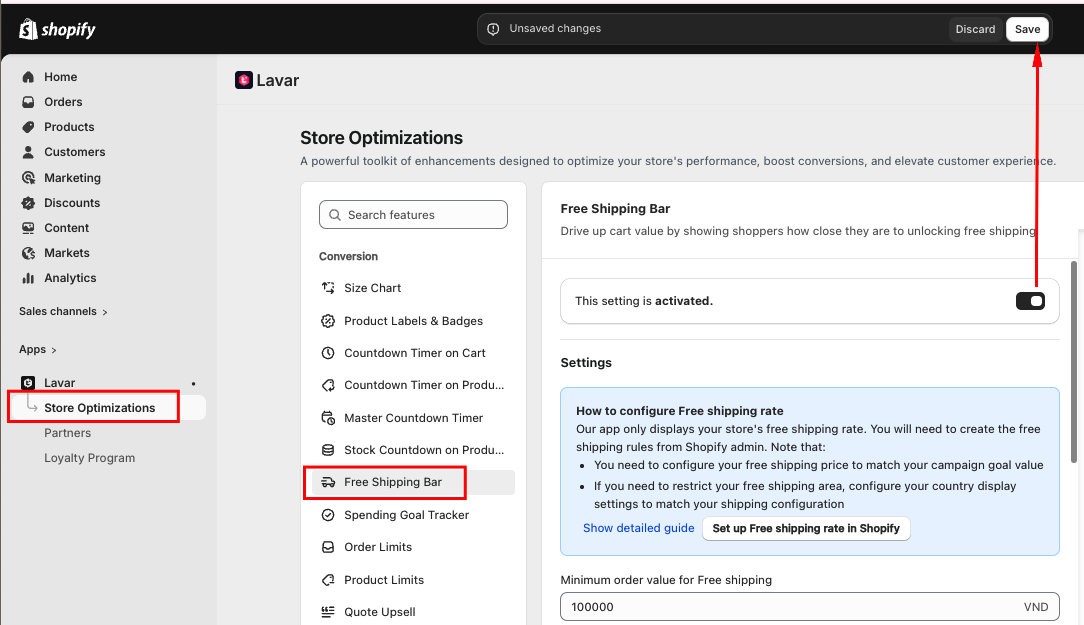
Image source: Lavar Help Center — Free Shipping Bar Configuration.
Step 3: Match the minimum order value
In Lavar, enter the minimum order value that matches the free shipping goal configured in Shopify.
If the actual shipping threshold is $75 but the progress bar is configured for $50, customers may receive a free shipping message before they actually qualify.
Lavar's documentation specifically instructs merchants to keep the free shipping goal aligned with the configured Shopify shipping rate.
Review country display settings if the offer is available only in selected locations.
Step 4: Customize the progress messages
Lavar supports messages for three cart stages:
- Initial: When the cart is empty.
- In progress: When the cart has not reached the goal.
- Goal reached: When the threshold has been met.
Suggested customer-facing wording:
| Cart Stage | Message Example |
|---|---|
| Empty cart | Free shipping on eligible orders over $75. |
| In progress | You're $12 away from free shipping! |
| Goal reached | Your order qualifies for free shipping! |
These are illustrative messages. Use Lavar's supported dynamic variables for the actual goal and remaining amount rather than entering fixed numbers into every cart state.
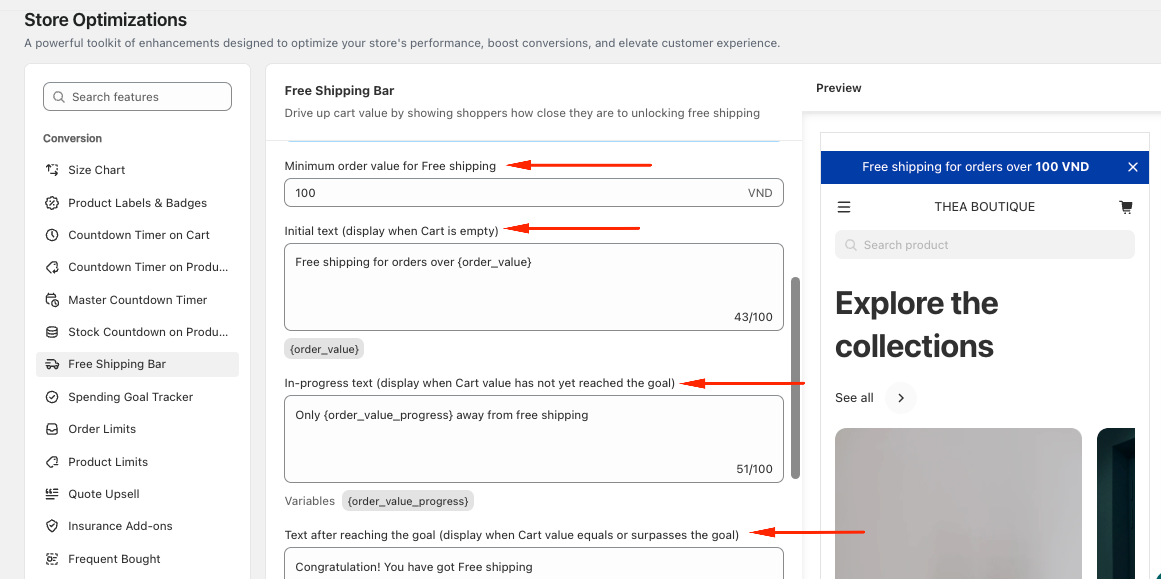
Image source: Lavar Help Center — Free Shipping Bar Message Settings.
Step 5: Check the storefront appearance
Use Lavar's appearance settings to match the bar's colors to your store design.
Ensure the progress message remains readable on desktop and mobile.
The documented Free Shipping Bar experience is a storefront bar. Do not assume it automatically offers independent placement controls for every cart drawer or cart page layout.
Test the published theme to determine exactly where the bar appears and whether customers see the message during cart review.
Free Shipping Progress Bar: Cart Drawer vs. Cart Page
The most useful placement is where customers can evaluate their current cart total and decide whether adding another product makes sense.
Cart drawers support quick add-on decisions
A cart drawer appears without requiring a full page transition in supported themes.
When a progress message is visible alongside cart contents and relevant recommendations, customers may be able to identify a small basket gap and continue shopping quickly.
However, cart drawers can be crowded on mobile, particularly when they also contain upsells, discount fields, payment messages, and other widgets.
Use only the information necessary for the immediate purchase decision.
Cart pages allow more room for explanation
A dedicated cart page provides space for the progress message, order summary, shipping information, and any relevant product recommendations.
This can be helpful when the free shipping offer has meaningful exclusions or conditions.
However, lengthy explanations should not push the checkout button far below the visible area.
Make sure the message is accurate wherever it appears
Check whether the progress indicator updates when shoppers add products, remove items, change quantities, or apply discounts.
Also confirm that the message does not promise free shipping for an unsupported destination.
Lavar's official documentation confirms progress-message updates but does not establish universal support for every third-party cart drawer or all discount and currency combinations.
These configurations should be tested in the actual storefront.
When a Free Shipping Bar May Not Be the Right Strategy
Some stores may benefit more from transparent shipping rates or a different incentive than from encouraging customers toward a free shipping threshold.
Low-margin catalogs
Stores selling products with narrow margins may struggle to recover shipping costs through small add-on purchases.
For example, if an additional $15 product generates only $3 of gross profit, losing $5 in shipping revenue could reduce the order's contribution.
In that case, a higher threshold or alternative shipping pricing model may be more appropriate.
Heavy or oversized products
Shipping costs can rise substantially when customers add heavy or bulky products.
A progress bar based only on product value may encourage a larger shipment that costs disproportionately more to fulfill.
Merchants should review weight-based, carrier-calculated, and product-specific shipping configurations where relevant.
Products with large natural basket gaps
If customers typically spend $30 while the threshold is $100, the progress bar may not offer a realistic incentive.
The merchant could test a different reward, a more relevant add-on recommendation, or simply clearer shipping pricing.
The appropriate strategy depends on customer behavior and the store's product economics.
Measure AOV and Contribution Profit Before and After
A free shipping bar should be evaluated using both purchasing behavior and order-level profitability.
Compare more than average order value
AOV is an important metric, but it should not be the only one.
Monitor:
- Average order value.
- Checkout conversion rate.
- Percentage of orders qualifying for free shipping.
- Average shipping cost per order.
- Shipping revenue collected.
- Merchandise gross profit.
- Contribution profit after shipping and other variable costs.
A campaign may increase AOV while reducing contribution per order. Another may improve overall profit through better checkout conversion even if the contribution per order declines slightly.
Both outcomes require proper measurement.
Run a controlled threshold comparison
Where testing capabilities permit, compare alternative thresholds using similar traffic and product conditions.
For example, assess a $75 threshold against a $90 threshold rather than changing the shipping goal alongside product prices, paid campaigns, and discount offers.
For each option, examine how many customers add products, how many qualify without changing their carts, and what happens to contribution profit.
Do not treat a higher percentage of free shipping orders as success by itself.
Watch for hidden increases in fulfillment cost
When a customer adds one more product, the order may require additional packaging, picking time, or a heavier shipping service.
These costs can erase a seemingly positive margin calculation.
Review actual carrier charges and fulfillment records rather than relying exclusively on average shipping estimates.
Shopify Free Shipping Bar Profitability Checklist
Before launching a free shipping progress bar, confirm that the offer is financially reasonable and accurately represented in the storefront.
- Calculate current AOV: Use a consistent order revenue definition and reporting period.
- Analyze cart distribution: Identify how many customers already spend above each proposed threshold.
- Measure shipping costs: Include actual carrier and fulfillment expenses.
- Calculate merchandise margins: Assess the profitability of likely add-on products.
- Estimate the basket gap: Choose a threshold customers can realistically reach.
- Compare contribution: Calculate whether additional product margin covers lost shipping revenue.
- Review discounts: Test how eligible cart value changes after promotions.
- Check market eligibility: Avoid advertising free shipping in unsupported regions.
- Align Shopify and Lavar: Match the configured shipping threshold and progress goal.
- Measure results: Track conversion, AOV, shipping subsidies, and contribution profit.
Final Thoughts
A Shopify free shipping bar can encourage customers to build larger carts, but the threshold should be based on profitability rather than an arbitrary number. Start with AOV, cart distribution, shipping costs, and gross margin, then evaluate whether the additional product contribution covers the shipping benefit. Shopify manages the actual shipping eligibility, while Lavar helps communicate progress toward the configured goal. The strongest free shipping strategy is one that gives customers a realistic incentive to spend more without sacrificing the contribution profit needed to fulfill those orders sustainably.
FAQ
What is the best free shipping threshold for Shopify?
There is no universal threshold. Start with your AOV, examine cart-value distribution, and calculate whether the gross profit from likely add-on purchases can cover lost shipping revenue and any additional fulfillment costs.
Does Lavar automatically create free shipping rates in Shopify?
No. Lavar's Free Shipping Bar displays progress toward an existing free shipping offer. Merchants must configure the eligible free shipping rate in Shopify and ensure that the bar's goal matches the actual threshold.
Should free shipping apply before or after discounts?
Shopify's free shipping discounts calculate minimum purchase eligibility using applicable discounted product prices. Other shipping-rate configurations should be tested separately. The progress bar should reflect the actual eligibility calculation used at checkout.
Read More


