
Where To Put Shopify Trust Badges Without Clutter
Learn where to put Shopify trust badges on product pages, cart, checkout, collections, and mobile without creating visual clutter.


Shopify trust badges work best when they appear close to the specific objection they are meant to resolve.
A return-policy badge belongs where shoppers worry about returns, a shipping badge belongs near shipping decisions, and a payment badge belongs close to the transaction rather than being repeated across every section of the store.
The goal is not to add as many credibility signals as possible. It is to show the right signal at the moment the shopper needs reassurance without making the store look noisy or overly defensive.

Match Each Trust Badge to a Shopper Objection
Trust badge placement becomes easier when every badge has one clear question to answer.
Product trust belongs near product decisions
Claims about materials, product quality, guarantees, returns, fit, or product-specific shipping usually belong on the product page.
The shopper is evaluating the item at that point, so the badge should support that decision instead of appearing only after the product reaches the cart.
Transaction trust belongs near the purchase action
Secure payment, accepted payment methods, free-shipping thresholds, and checkout-related reassurance make more sense near Add to Cart, the cart summary, or the checkout action.
They address uncertainty about completing the transaction rather than uncertainty about the product itself.
One useful signal beats several generic ones
A row of six unrelated badges can force the shopper to process more visual information without answering the question that is actually stopping the purchase.
Choose the signal that matches the current objection instead of treating every open space as another badge location.
Trust Badges on the Product Page
The product page is the strongest location for trust signals that help shoppers decide whether a specific item is right for them.
Put policy reassurance near the buying area
Return windows, satisfaction guarantees, shipping promises, or other purchase protections can sit near the price, variant selector, or Add to Cart area when those policies materially affect the decision.
Keep the badge concise, then link or point shoppers toward the full policy when the terms need explanation.
Keep product claims close to supporting information
A badge such as “Organic Material,” “Dermatologist Tested,” or another product claim should appear where the shopper can verify what it means.
A credibility signal becomes weaker when the badge makes a strong claim but the product page contains no supporting detail.
Use different badges for different products
Not every product needs the same reassurance.
Lavar's product-page Trust Badges feature lets merchants choose whether badges appear on all products or only specific products, making it easier to match the signal to the merchandise rather than using one global badge row everywhere.
Trust Badges Near Add to Cart
The Add to Cart area should answer the final objections that remain before the shopper commits the product to the purchase flow.
Use shipping reassurance when delivery is the concern
A clear free-shipping threshold, dispatch promise, or relevant delivery message can work near the buying button when shipping uncertainty is likely to delay the decision.
Do not replace detailed delivery information with a vague “Fast Shipping” badge if the store cannot explain what that promise means.
Use payment reassurance only when it adds information
Payment or secure-checkout badges can be helpful when shoppers need confidence about the transaction, but they should not dominate the product page.
If accepted payment methods are already clearly visible, repeating a large block of payment logos beside the button may add more clutter than reassurance.
Avoid stacking every trust signal under one button
Returns, payment security, free shipping, guarantees, certifications, awards, and delivery claims do not all need to appear in the same row.
Choose the one or two signals most relevant to the product and move supporting information into expandable content or other appropriate sections.
Trust Badges on the Cart Page
The cart is a good place for reassurance about the order as a whole because the shopper has moved from product evaluation to purchase review.
Reinforce returns and shipping policies
A shopper reviewing the cart may be thinking about total shipping cost, return flexibility, delivery expectations, or whether the order qualifies for a threshold-based benefit.
A concise trust signal can reinforce those policies before the shopper moves into checkout.
Place transaction reassurance near checkout
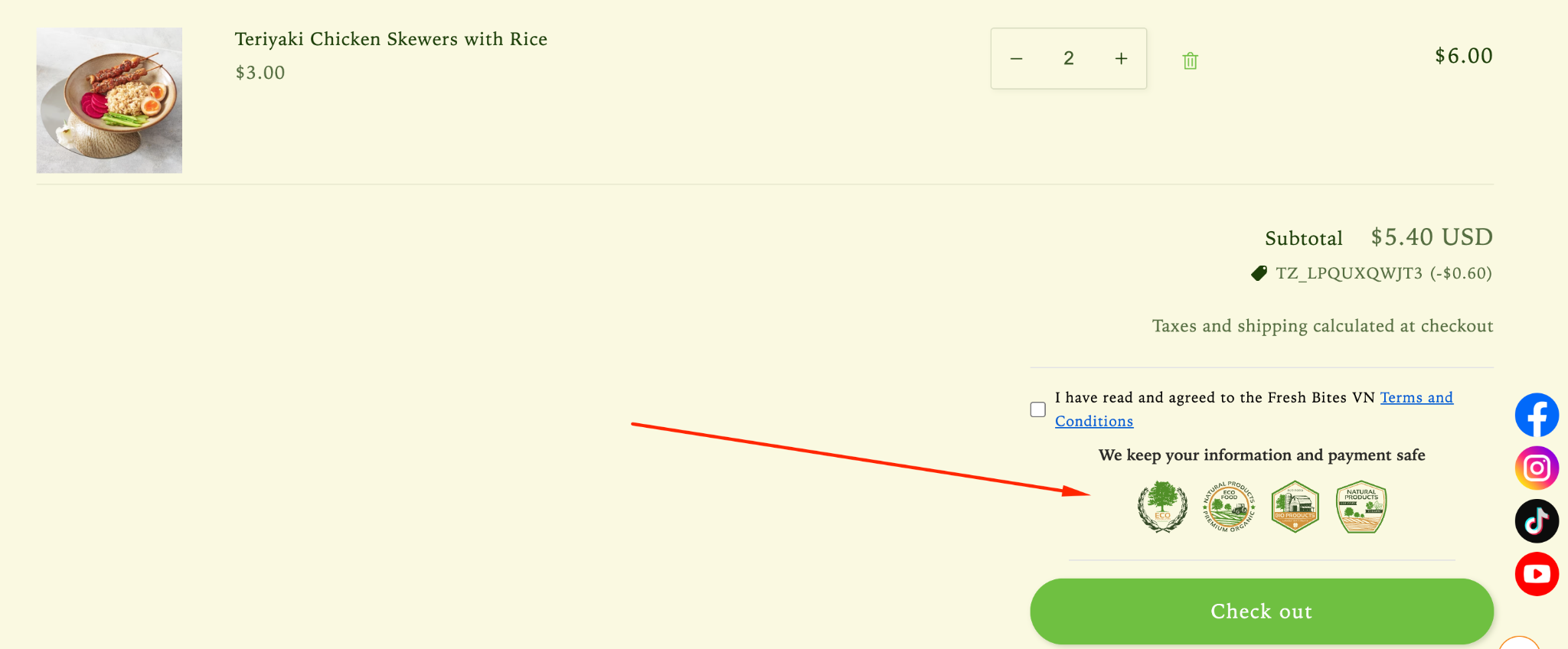
Trust badges close to the checkout button can support the transition from reviewing the cart to entering payment information.
Lavar currently lets merchants position cart trust badges above or below the checkout button and choose between inline and box-covered presentation styles.
Keep the cart hierarchy intact
The cart still needs a clear primary action.
A badge block should support the checkout button rather than becoming larger, brighter, or more visually dominant than the action the shopper is supposed to take.
Trust Badges at Checkout
Checkout usually benefits from fewer additional signals because the shopper is already focused on completing the transaction.
Do not recreate the product page inside checkout
Once the shopper reaches checkout, repeating material claims, product-status badges, promotional labels, and several guarantees can distract from completing the form.
Keep checkout-oriented reassurance tightly connected to security, payment, delivery, or another question that still matters at that stage.
Use native trust signals where they already exist
Shopify checkout already contains recognizable payment and transaction elements, and some official Shopify trust programs can display their own eligible badges in supported locations.
Adding another generic “Secure Checkout” icon does not automatically improve the experience if the platform is already communicating the same information clearly.
Do not make unsupported security claims
A lock icon or shield graphic should not imply a certification, insurance policy, or security guarantee the merchant does not actually have.
Checkout is where exaggerated trust claims can look especially suspicious because shoppers are about to enter personal or payment information.
When Trust Badges Belong on Collection Pages
Collection pages have limited space, so badges should help shoppers compare products rather than explain detailed store policies.
Use quick signals that change product choice
Collection-level badges work best for fast information such as Best Seller, New Arrival, Free Shipping where genuinely product-specific, or another short attribute that helps shoppers decide what to open.
The shopper should understand the meaning without stopping to read a paragraph.
Do not repeat generic store trust on every card
A “Secure Payment” badge repeated across 20 product cards does not help shoppers compare those products.
Store-wide transaction trust belongs closer to the transaction, while collection space should prioritize signals that differentiate the products.
Separate product labels from trust guarantees
“New Arrival” describes product status, while “30-Day Returns” describes a policy and a payment logo describes an accepted transaction method.
Keeping those roles separate prevents the collection page from becoming a grid of unrelated symbols.

Payment Logos and Guarantee Badges Are Different
Payment badges tell shoppers how they can pay, while guarantee badges communicate a promise the merchant is expected to honor.
Payment logos communicate availability
A Visa, Mastercard, PayPal, or another payment logo generally tells shoppers that a payment method is accepted.
It does not by itself communicate a return policy, product guarantee, shipping promise, or independent endorsement of the store.
Guarantee badges communicate merchant commitments
Badges such as “30-Day Returns,” “Money-Back Guarantee,” or “Free Returns” describe conditions the merchant is promising to customers.
Those claims should match the actual policy and link to clear terms when exclusions or conditions apply.
Certification badges require evidence
Third-party endorsements, sustainability marks, safety certifications, professional approvals, or membership logos should only be displayed when the store or product genuinely qualifies to use them.
A real certification can strengthen credibility; an unsupported badge can do the opposite.
How to Place Trust Badges on Mobile
Mobile placement needs stricter visual discipline because every badge competes with product images, price, variants, and purchase controls in a narrow viewport.
Keep the badge close to the relevant action
A shopper should not need to scroll several screens away from Add to Cart to find the guarantee intended to reduce purchase hesitation.
Keep important reassurance near the decision it supports while avoiding interruptions between the shopper and the primary button.
Watch wrapping and icon size
A badge row that looks compact on desktop can wrap into several lines on a phone and push the purchase action lower on the page.
Use smaller, readable icons and short labels rather than squeezing a desktop-sized trust strip into the mobile layout.
Test the first mobile viewport
Review the product page with a real mobile viewport and ask what the shopper sees before scrolling.
If the first screen contains more badges than product information or purchase controls, the trust system is competing with the product instead of supporting it.
Which Trust Badges Need Supporting Evidence?
The stronger the claim on a trust badge, the more important it is that the store can substantiate it.
Policy badges should match current policies
“Free Returns,” “30-Day Guarantee,” or “Ships in 24 Hours” should reflect the actual terms customers will receive.
If the policy changes, update the badge at the same time rather than leaving an outdated promise on product or cart pages.
Product claims should be verifiable
Material, sustainability, testing, origin, safety, or quality badges should be based on information the merchant can support.
The badge is a shortcut to evidence, not a substitute for evidence.
Urgency should reflect a real condition
Trust can also be damaged when labels such as “Low Stock” or “Limited” are displayed permanently regardless of inventory.
Use dynamic or clearly defined badge conditions where possible so the signal remains credible over time.
How Lavar Helps Control Trust Badge Placement
Lavar separates product-page and cart trust-badge controls so merchants can put reassurance closer to the decision it supports.
Place product-page badges where they fit the layout
Lavar provides a Trust Badges block for product pages that can be moved within the Shopify Theme Editor.
Merchants can configure badge order, style, colors, size, and whether the trust section appears on all products or selected products.
Control cart placement around checkout
Lavar's cart trust-badge settings let merchants display the badge section above or below the checkout button.
The app also provides separate badge-size controls for desktop and mobile, which is useful when the same row becomes too visually heavy on smaller screens.
Use placement to reduce noise rather than add more badges
The value of flexible placement is not that every available position should contain a badge.
Use Lavar to match the signal to the objection: product reassurance on the product page, transaction reassurance near checkout, and fewer signals where the shopper already has enough information.
A Trust Badge Placement Checklist
Before adding another badge, define the shopper objection, the best location, and the evidence behind the claim.
Start with the objection
| Shopper Question | Useful Signal | Best Starting Location |
|---|---|---|
| Can I return this? | Return-policy badge | Product page / cart |
| When will it ship? | Shipping or dispatch message | Product page / cart |
| Is payment supported? | Accepted payment methods | Purchase area / cart |
| Is this product certified? | Verified certification badge | Product information area |
| Can I trust this guarantee? | Guarantee badge with clear terms | Product page / cart |
| Which product should I open? | Best Seller or relevant product label | Collection page |
Remove duplicate signals
If the same guarantee appears beside the title, below the price, beneath Add to Cart, inside an accordion, and again in the cart, remove the versions that do not add new information.
Repetition can make an important claim feel like advertising rather than reassurance.
Review desktop and mobile separately
Check product pages, cart pages, sticky purchase elements, collection cards, and mobile layouts after adding trust badges.
The strongest placement is the one where the badge remains visible and relevant without pushing more important content out of the shopper's path.

Final Thoughts
Shopify trust badges work best when placement follows the shopper's objection: use product-specific assurances on product pages, transaction reassurance near Add to Cart or the cart, fewer additional signals at checkout, and only quick comparison cues on collection pages, while keeping every guarantee, certification, shipping promise, and payment message accurate enough to earn the trust the badge is supposed to create.
FAQ
Where should I put trust badges on Shopify?
Place each badge close to the decision it supports: product and guarantee signals on product pages, payment or order reassurance near purchase actions and the cart, and only concise comparison signals on collection pages.
Should trust badges go above or below Add to Cart?
Either can work if the signal remains close to the purchase action without competing with the button. Test the layout on mobile and keep the badge row secondary to the primary call to action.
How many trust badges should a Shopify store use?
Use as few as necessary to answer the shopper's real objections. One or two relevant signals near a decision point are usually clearer than a large strip of unrelated badges.
Read More

